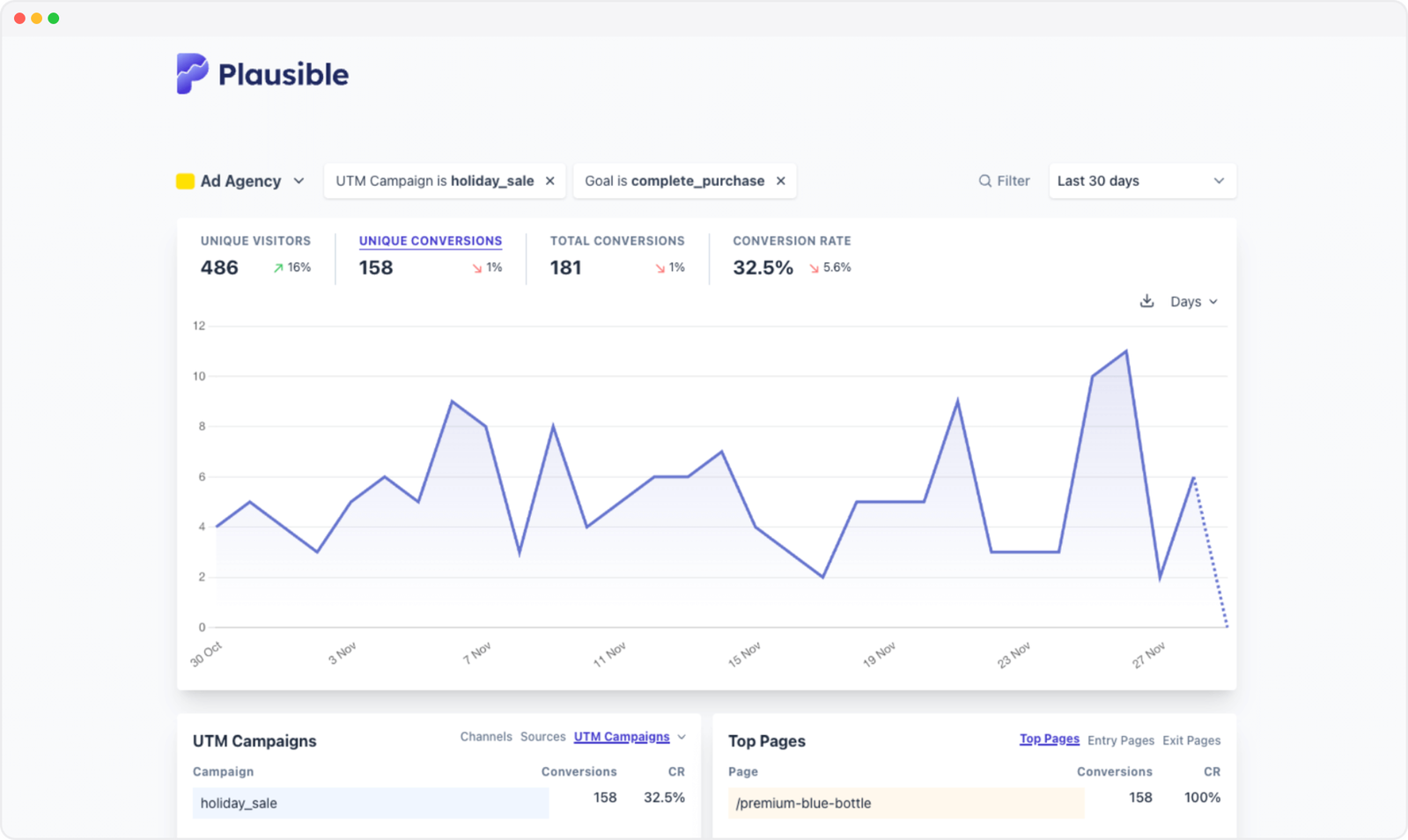
If you run Google Ads or other paid campaigns, Plausible can show you what visitors do after clicking an ad: which pages they visit, whether they complete a goal or funnel, and how much revenue a campaign generates.
Plausible measures aggregate website activity without tracking people across sites. To protect visitor privacy, it does not retain the visitor-level data needed to import conversions into Google Ads or build retargeting audiences. You can still analyze paid traffic and conversions inside Plausible. This guide explains how to set that up and why those limitations exist.
Plausible Analytics and Google Ads: what is and isn’t possible?
| What you want to do | Possible with Plausible? | How it works |
|---|---|---|
| See traffic from Google Ads | Yes | Plausible recognizes Google Click IDs (GCLIDs) or UTM-tagged links. |
| Compare campaigns, ads and keywords | Yes, with UTM tagging | Add UTM parameters to your Google Ads URLs. |
| Attribute goals and revenue to paid campaigns | Yes | Filter the dashboard by campaign and view goals, funnels and revenue using Plausible’s last-touch attribution. |
| Import Plausible conversions into Google Ads | No | Google needs a click identifier or supported user-provided data to match an imported conversion to an ad interaction. Plausible does not retain that visitor-level data. |
| Build retargeting audiences from Plausible visitors | No | Plausible does not create individual visitor profiles or track people across sites. |
- Plausible Analytics and Google Ads: what is and isn’t possible?
- What’s wrong with Google Analytics?
- Why choose Plausible Analytics over Google Analytics?
- Setup and track your paid campaigns with Plausible
- Using Google Ads with a privacy-first analytics tool
- Give Plausible a try
What’s wrong with Google Analytics?
Google Analytics does not always track ads performance accurately because it can miss conversions. C’mon Google, you had one job!
If you were to compare the number of conversions, like filling up a contact form or purchasing something, within Google Analytics and another tool measuring the same thing (like in your marketing automation tool or CRM), you would see some differences.
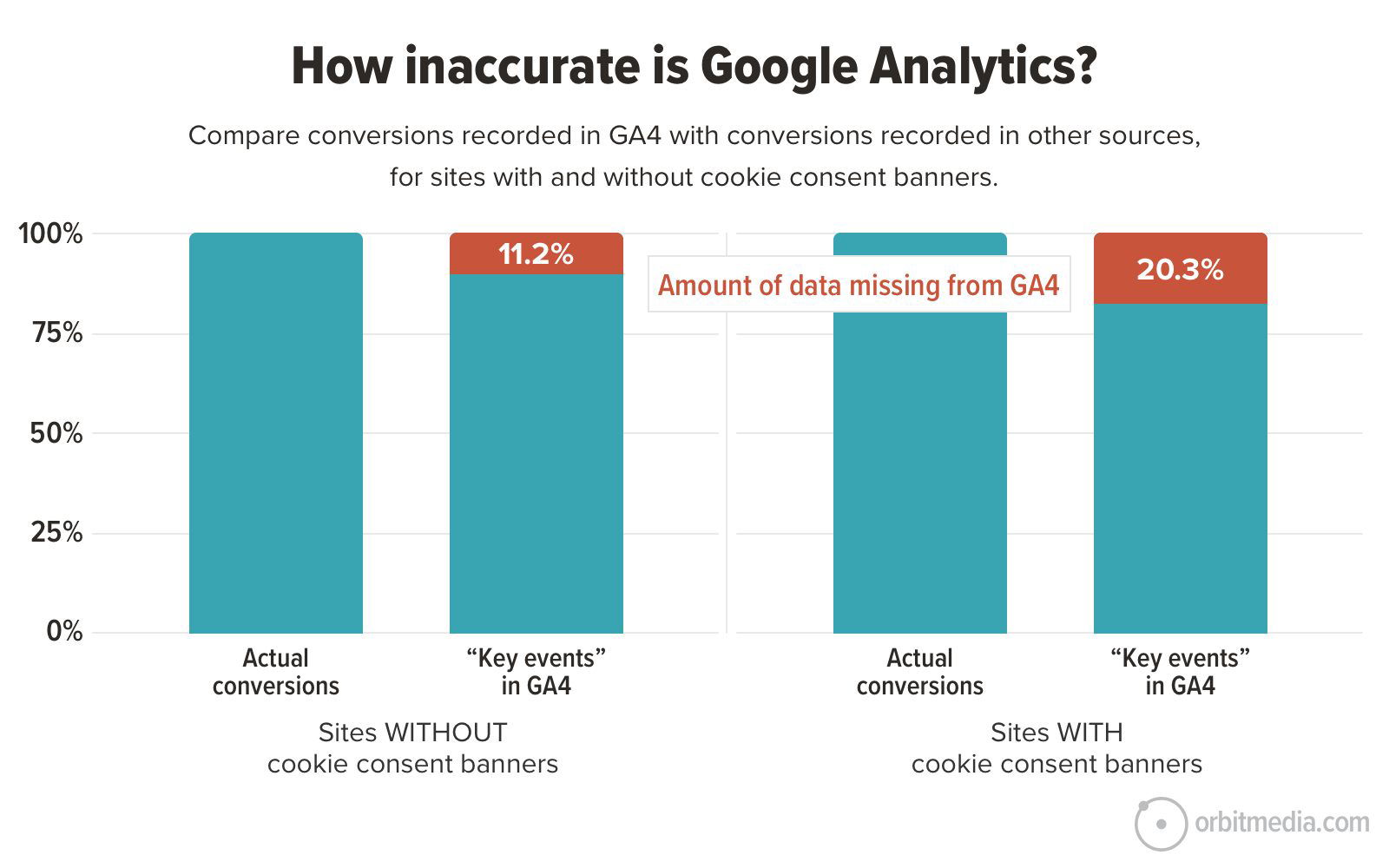
Orbit Media did an independent experiment and found such results, claiming that every number in Google Analytics is wrong. Here’s why:
- Consent banners: Google Analytics may require a consent banner, depending on your configuration and the laws that apply. If visitors decline, their sessions cannot be fully tracked.
- Ad blockers and browser privacy protections: These can prevent GA4 from recording some visits.
In Orbit Media’s sample, GA4 underreported conversions by an average of 20.3% on sites using a consent banner and 11.2% on sites without one.
There are other ways in which Google Analytics is inaccurate, for reasons like spam and bot traffic skewing data, conversion attribution inaccuracy, data modeling, etc. We cover all this here.
Why choose Plausible Analytics over Google Analytics?
Plausible offers other advantages and makes a lot of sense as an analytics tool of choice.
- Lightweight script: Plausible’s tracking script is 54x smaller than GA4’s, not slowing down your site
- Simple dashboard: No complex menus, just effective, actionable insights.
- Privacy-friendly by design: Plausible doesn’t require a cookie consent banner because it doesn’t track or store personal data.
- Dedicated support: You get faster assistance directly from the core team, something missing from Google Analytics.
We have a detailed comparison here.
Track paid campaigns without relying on cookies or a consent banner
Setup and track your paid campaigns with Plausible
While setting up your ads in Google or anywhere, make sure to UTM-tag your links. This will help Plausible to correctly identify the traffic as paid, from which referral exactly, which campaigns, terms, and content used as specified in the UTM-tagging done by you.
Please note we work with a last-touch attribution model because of our privacy-first nature. This means that the traffic source from which such sessions were acquired where conversions happened, are the ones credited for that conversion.
Tagging URLs in Google Ads
When it comes to Google Ads, you can utilize either auto-tagging or manual UTM tagging. Here’s how to do it:
Using auto-tagging in Google Ads
Google Ads’ auto-tagging generates a GCLID (Google Click ID) for tracking ad performance. It is turned on by default for new accounts. When someone clicks your ad, auto-tagging adds a parameter called GCLID to the URL.
For example, if someone clicks your ad for https://yourwebsite.com, the final URL may look like https://yourwebsite.com/?gclid=123xyz.
To check if it is turned on for you, follow these steps:
Step 1: Sign in to your Google Ads account.
Step 2: Click the Admin icon and select Account settings.
Step 3: Click the Auto-tagging section.
Step 4: Check the box next to “Tag the URL that people click through from my ad” if it is not already checked.
Step 5: Click Save.
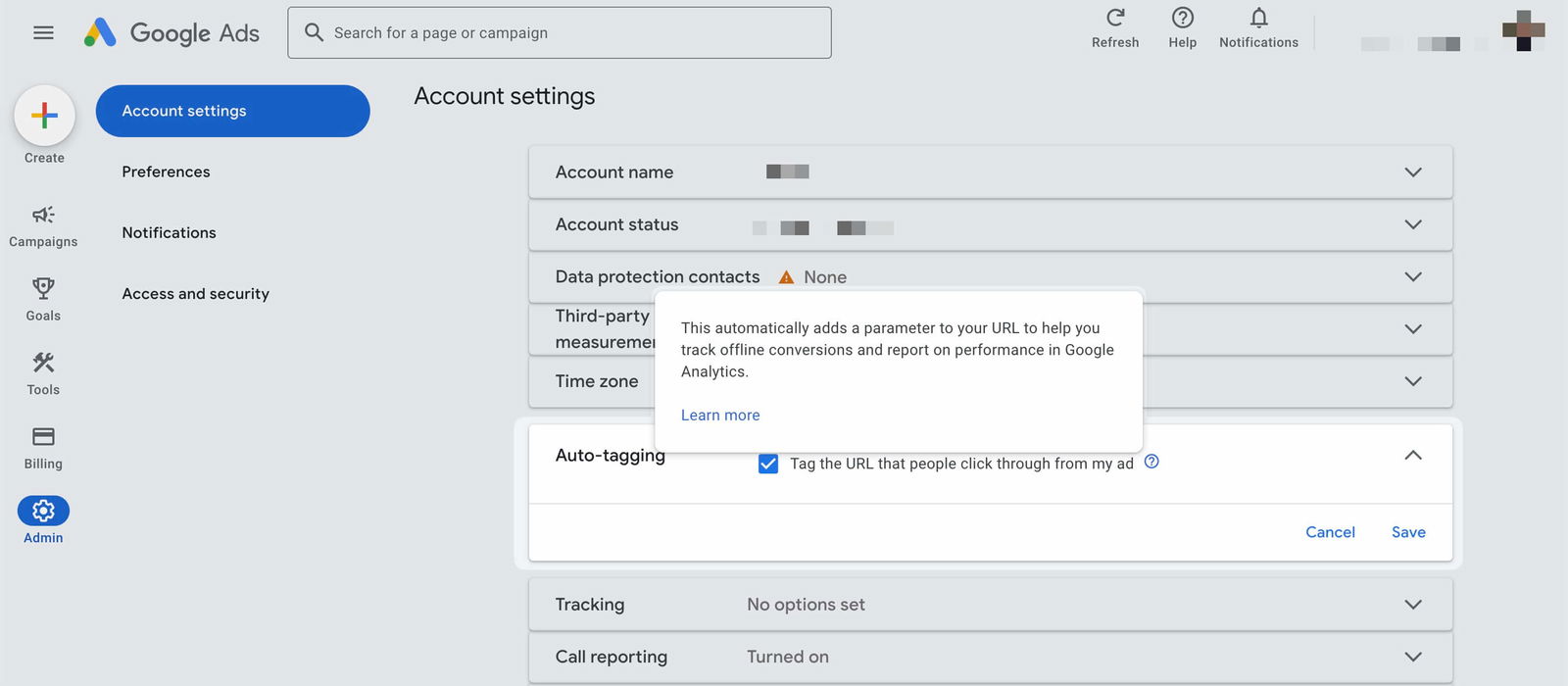
Once auto-tagging is enabled, Plausible will detect traffic from links with GCLID parameters. We strip the unique GCLID value before storing the pageview, but you can still measure aggregate traffic and conversions from Google Ads.
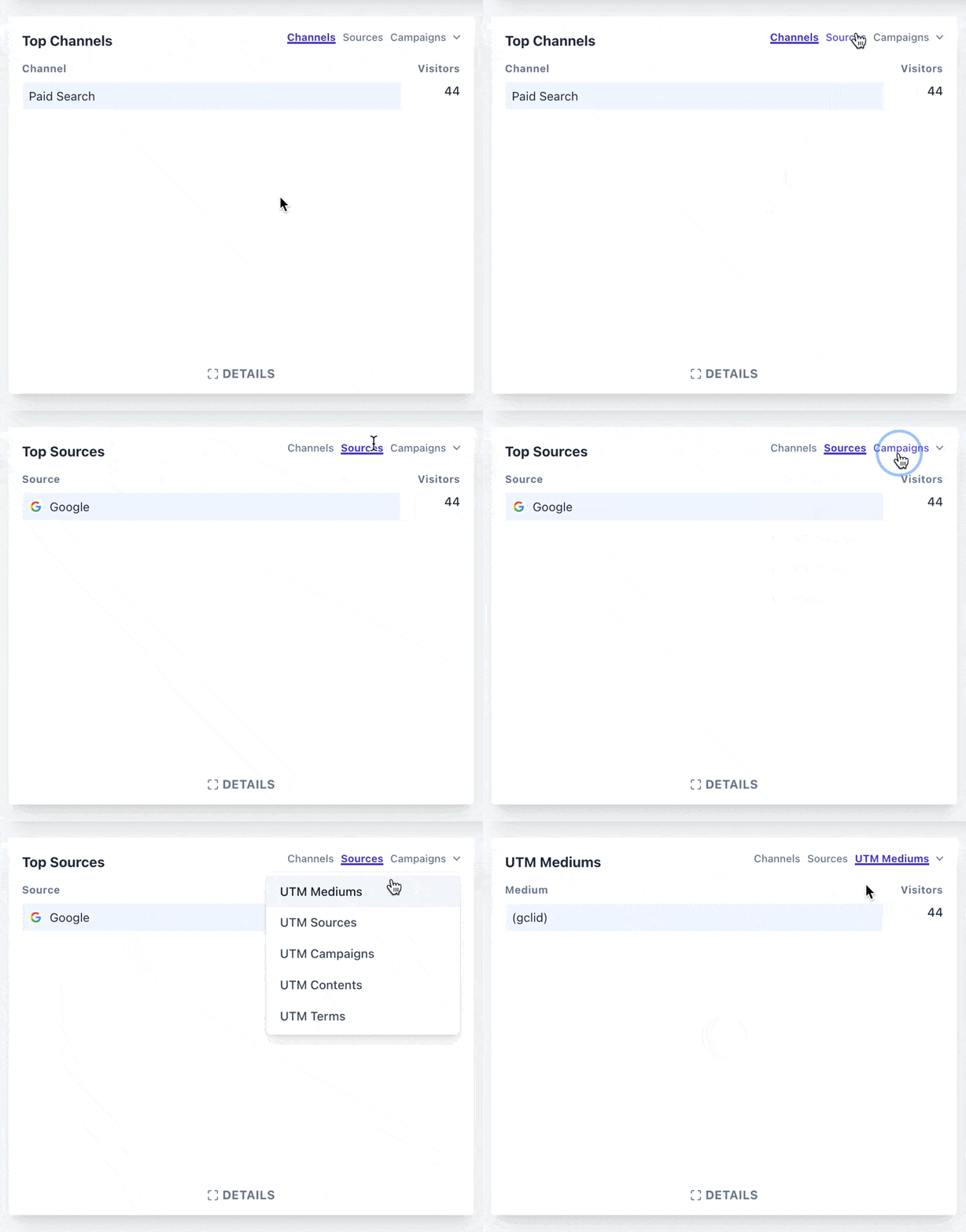
Traffic from Google Ads will be categorized as follows in the Sources report:
- In the “Channels” tab as “Paid Search”
- In the “Sources” tab as “Google”
- In the UTM Medium report as “(gclid)”
Manually tagging links with UTM parameters
With auto-tagging alone, Plausible identifies the visit as paid Google traffic, but it does not populate the UTM Campaign, UTM Content or UTM Term reports. For more granular tracking or if you prefer not to use auto-tagging, you can manually add UTM parameters to your ad URLs.
When UTM tags are present in the URL, they take priority over other parameters. Unlike the “gclid” and “msclkid” marketing parameters, we do not strip the values of UTM tags, which provides you more context.
To track your campaigns using this method, follow these steps:
Step 1: Create a UTM-tagged URL. Use the UTM builder to generate correctly formatted links, or build one manually. If you already have a tagged URL and want to validate it first, run it through the UTM checker. For example: https://yourwebsite.com?utm_source=google&utm_medium=ppc&utm_campaign=spring_sale&utm_content=text_ad&utm_term=shoes
Explanation of parameters:
- utm_source: Platform driving traffic (e.g., Google).
- utm_medium: Type of traffic (e.g., PPC).
- utm_campaign: Campaign name (e.g., Spring Sale).
- utm_content: Used to differentiate ad creatives (e.g., Text Ad).
- utm_term: Keyword or target term (e.g., Shoes).
You can learn more about UTM tracking in our guide.
Step 2: Add the tagged URL to your Google Ads. You can either add the complete UTM-tagged URL as the Final URL or put the tracking parameters in Google Ads’ Final URL suffix field.
- Navigate to “Campaigns” from the left sidebar -> “Ads”
- Select the ad you want to edit or create a new ad.
- Add the tagged URL to the Final URL field, or expand “Ad URL options” and add the parameters to the Final URL suffix without the leading
?. - Save your changes.
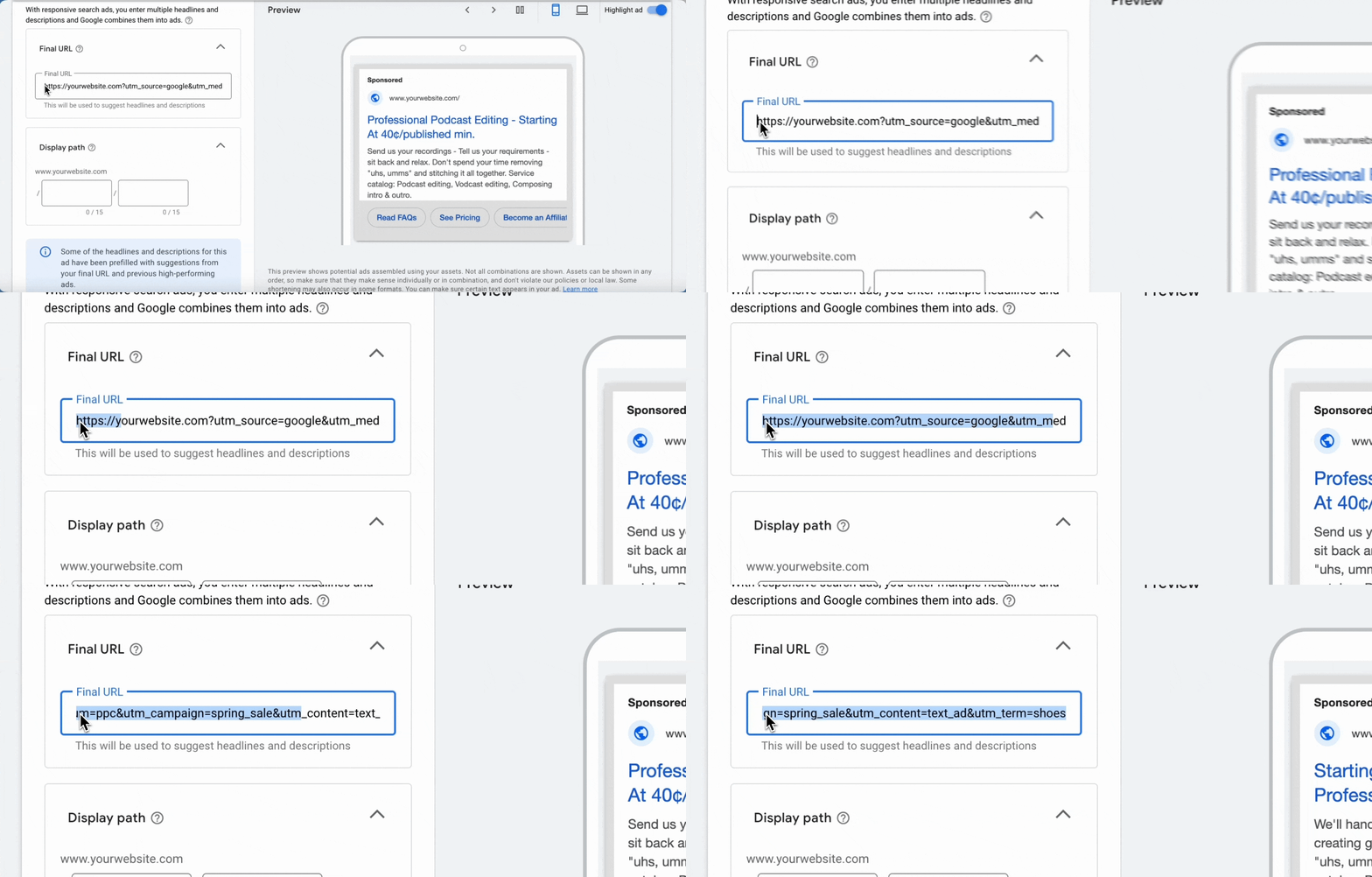
Now, traffic from these ads will appear in Plausible under the Campaigns tab, categorized by UTM parameters.
Tracking campaign performance in Plausible
In a nutshell, our simple dashboard allows you to filter and visualize campaign performance effectively in three steps:
- Filter campaign data: Use the Campaigns tab to isolate specific traffic sources, mediums, or campaigns (e.g., utm_campaign=holiday_sale).
- Track conversion goals (e.g., form submissions or purchases) and other activity on the site (like which pages were visited) in Plausible, to see how many visitors from ads completed them.
- Use funnels: Create a funnel to visualize the customer journey and conversion drop-offs at each stage.
The Campaigns tab in Plausible (check out our live demo) shows which exact campaign or ad brought you how much traffic. Such traffic can be isolated by filtering the dashboard with the exact acquisition source.
You can isolate traffic by selecting any UTM parameter from the campaigns tab:
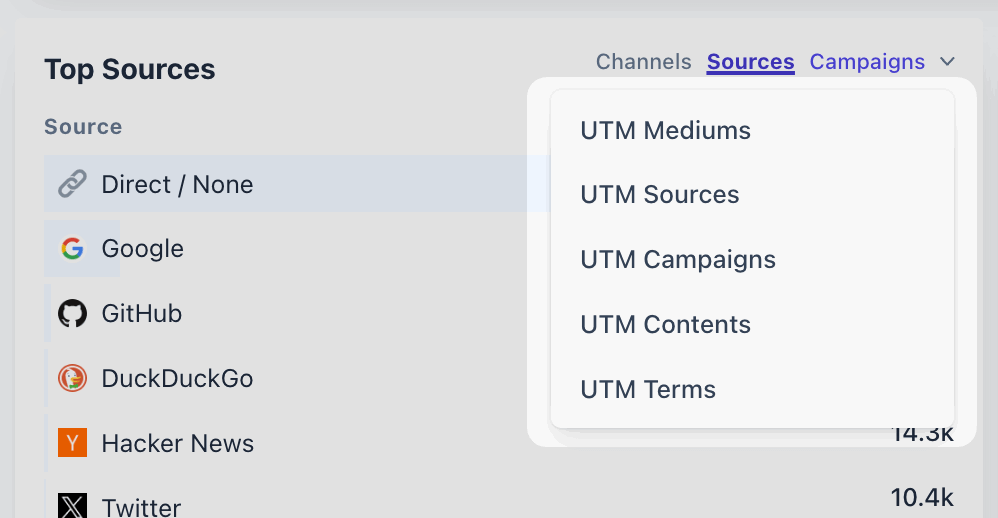
This filtered dashboard shows what all happened in the sessions acquired from those campaigns: which pages were visited, which conversion goals were completed, and even which locations these visitors were from (including VPN entries), which devices, etc. they used.
You can set your site conversion goals using this guide, to help visualize the whole customer journey. Here’s an example of what a filtered dashboard would look like (notice the two filters at the top):
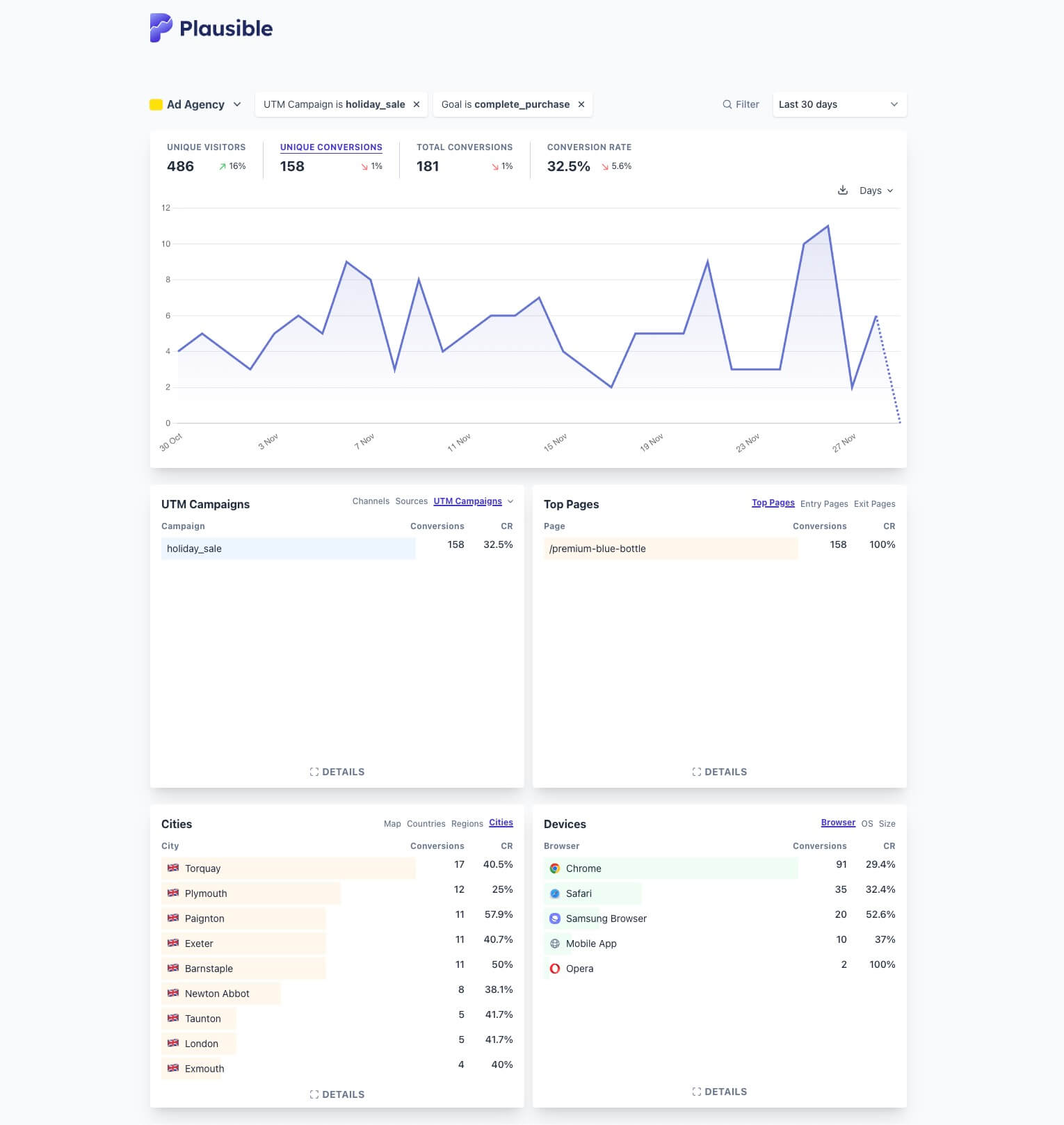
It’s as simple as that. You can also utilize funnels to visualize the percentage of visitors who completed a desired path exactly in their journey. And create audience segments.
You can also use website journey analytics to see what visitors from a specific campaign did next, or what they did before converting.
This way, you can track anything you want to with Plausible. For example:
- If you’re a SaaS, you can track the product sign ups coming from your ads.
- If you’re an e-commerce, you can track the revenue affected by your ads and calculate your ROI.
- Use the ad cost calculator to work out your CPC, CPM and CPA from your campaign numbers.
Having said that, if you are looking for a deeper integration of Google Ads with Plausible, we have the following limitations due to our privacy-first nature and out-of-the-box compliance with the different cookie laws and privacy regulations such as GDPR and PECR.
We do not track, collect nor store any personal data or personally identifiable information. The goal of Plausible Analytics is to track overall trends in your website traffic, it is not to track individual visitors and contribute to surveillance capitalism.
The privacy of your website visitors is important to us so we do not track any individual people.
We also do not utilize or generate any cookies or persistent identifiers. We generate a random string of letters and numbers that is used to calculate unique visitors on a website and we reset this string once per day. You can read more about these decisions here.
Using Google Ads with a privacy-first analytics tool
Importing Plausible goals into Google Ads
With Plausible, you can easily track pageview and custom goals, including revenue tracking and attribute them back to your paid campaigns using UTM parameters as explained above.
But if you want to import these goals or conversions directly into Google Ads, it is not possible. This is a consequence of Plausible’s privacy-first design: even when you export stats using a CSV or our Stats API, the data remains aggregated and does not identify individual visitors.
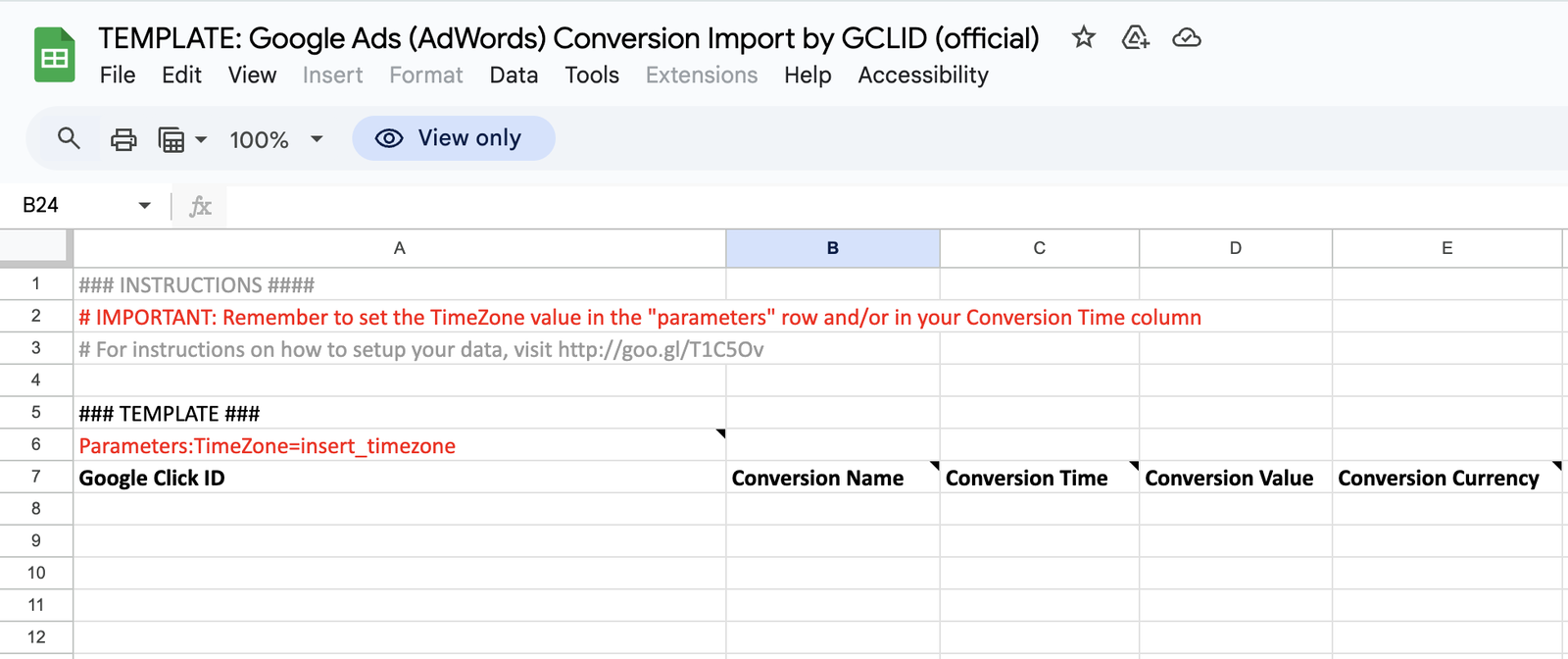
Google Ads needs to match an imported conversion to an ad interaction. Its current offline conversion guidance uses a GCLID or supported user-provided data for that matching. Plausible does not retain either, so its aggregate conversion data cannot satisfy that requirement. Here’s the official template:
As mentioned above, we strip the unique GCLID value before recording the traffic in Plausible.
You can import historical custom event data into Plausible using this CSV format. We also allow importing GA4 stats into Plausible.
Running retargeting campaigns
With Google Ads <> Google Analytics, you can retarget visitors who didn’t convert initially. According to Google’s current remarketing setup, you need to activate Google Signals or user-provided data collection, link your Google Ads and Analytics accounts, and enable ads personalization.
Google Signals can associate event data from consenting, signed-in Google users with demographic and interest data under GA4’s “User Attributes.” Ads personalization and remarketing require the appropriate consent where applicable.
Because Plausible is privacy-first, we don’t track or store personal data, so retargeting isn’t possible. This aligns with our commitment to respecting user privacy and complying with laws like GDPR and PECR.
Google announced in April 2025 that Chrome would maintain its existing approach to third-party cookie choice rather than roll out a new standalone prompt. Third-party cookies are still restricted in browsers such as Safari and Firefox, and behavioral advertising still carries privacy and consent considerations. Instead, consider privacy-friendly alternatives such as:
- Contextual advertising: Target users based on the content they’re engaging with.
- Newsletter advertising: Reach audiences directly in their inboxes.
- Private Marketplace Deals (PMP): Use curated ad deals that respect user privacy.
We cover the situation in-depth along with solutions here.
Give Plausible a try
In summary, Plausible provides an ethical, efficient, and privacy-first way to track your paid campaigns. While it has some limitations with Google Ads integration, it’s a solid alternative for those seeking accurate, lightweight analytics. You can start a free trial now, with no credit card required.